Konfigurasi Dasar Router Menggunakan CLI
This entry
was posted on March 21, 2012, in Uncategorized and tagged CCNA, CISCO, Cisco IOS, CLI, Jaringan, Packet Tracer, Routing, Switching. Bookmark the permalink. 2 Comments

Salah satu
cara konfigurasi pada router cisco adalah menggunakan CLI (Command Line
Interface). Kita harus belajar menghapal beberapa perintah yang cukup
penting pada konfigurasi dasar router ini. Perintah-peritah harus diketikan
pada terminal. Software yang menangani input/output dan pemerosesan
perintah-perintah adalah Cisco IOS (Internetwork Operating System).
Cisco IOS
adalah sistem operasi berbasis teks yang digunakan pada perangkat switch dan
router buatan Cisco. Perintah-perintah Cisco IOS dikelompokan menjadi beberapa
mode yang disebut Exec mode. Secara umum ada dua mode utama, User
Exec mode dan Privileged Exec mode. Pada Privileged Exec mode ini
kita bisa masuk pada Global Configuration yang biasa digunakan untuk
mengkonfigurasi IP pada tiap interface, Routing, Vlan dsb.
Untuk lebih
mendalam tentang CLI dan Cisco IOS bisa di browse di mbah Google:) Disini aku
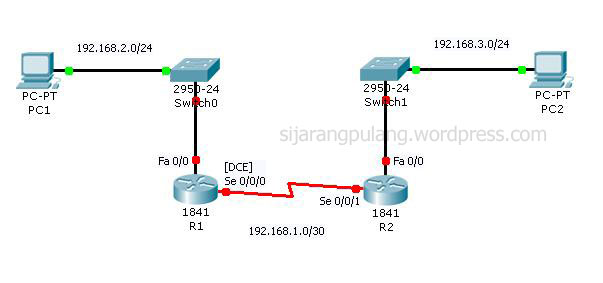
hanya akan memaparkan konfigurasinya saja berdasarkan Topologi yang sudah
direncakan di atas.
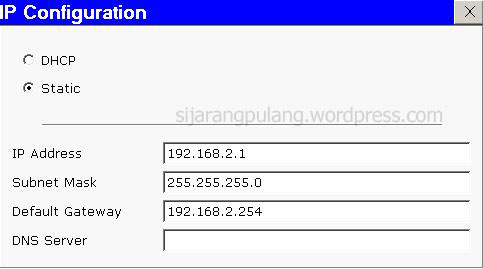
Setting IP
pada PC1 :

KONFIGURASI
R1
Masuk Global
Konfigurasi (Konfigurasi hostname, password privillage mode)
Router>enable
Router#configure terminal
Enter configuration commands, one per line. End with CNTL/Z.
Router#configure terminal
Enter configuration commands, one per line. End with CNTL/Z.
Router(config)#hostname
R1
R1(config)#enable secret class
R1(config)#enable secret class
Konfigurasi
Line Console dan Line VTY
R1(config)#line
console 0
R1(config-line)#password cisco
R1(config-line)#login
R1(config-line)#exit
R1(config)#line vty 0 4
R1(config-line)#password cisco
R1(config-line)#login
R1(config-line)#exit
R1(config-line)#password cisco
R1(config-line)#login
R1(config-line)#exit
R1(config)#line vty 0 4
R1(config-line)#password cisco
R1(config-line)#login
R1(config-line)#exit
Konfigurasi
IP Interface
R1(config)#interface
se0/0/0
R1(config-if)#ip address 192.168.1.1 255.255.255.252
R1(config-if)#clock rate 64000
R1(config-if)#no sh
R1(config-if)#ip address 192.168.1.1 255.255.255.252
R1(config-if)#clock rate 64000
R1(config-if)#no sh
%LINK-5-CHANGED:
Interface Serial0/0/0, changed state to down
R1(config-if)#exit
R1(config)#interface fa0/0
R1(config-if)#ip address 192.168.2.254 255.255.255.0
R1(config-if)#no sh
R1(config-if)#exit
R1(config)#interface fa0/0
R1(config-if)#ip address 192.168.2.254 255.255.255.0
R1(config-if)#no sh
%LINK-5-CHANGED:
Interface FastEthernet0/0, changed state to up
%LINEPROTO-5-UPDOWN:
Line protocol on Interface FastEthernet0/0, changed state to up
R1(config-if)#exit
Konfigurasi
Routing RIP Versi 2
R1(config)#router
rip
R1(config-router)#version 2
R1(config-router)#network 192.168.1.0
R1(config-router)#network 192.168.2.0
R1(config-router)#version 2
R1(config-router)#network 192.168.1.0
R1(config-router)#network 192.168.2.0
Menyimpan
Konfigurasi pada NVRAM
R1#copy
running-config startup-config
Destination filename [startup-config]?
Building configuration…
[OK]
Destination filename [startup-config]?
Building configuration…
[OK]
***
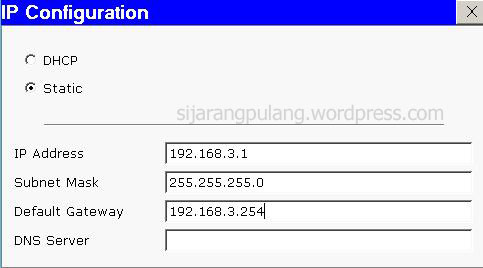
Setting IP
pada PC2 :

KONFIGURASI
R2
Masuk
Konfigurasi Global
Router>enable
Router#configure terminal
Enter configuration commands, one per line. End with CNTL/Z.
Router(config)#hostname R2
R2(config)#enable secret class
Router#configure terminal
Enter configuration commands, one per line. End with CNTL/Z.
Router(config)#hostname R2
R2(config)#enable secret class
R2(config)#line
console 0
R2(config-line)#pass cisco
R2(config-line)#login
R2(config-line)#exit
R2(config)#line vty 0 4
R2(config-line)#pass cisco
R2(config-line)#login
R2(config-line)#exit
R2(config-line)#pass cisco
R2(config-line)#login
R2(config-line)#exit
R2(config)#line vty 0 4
R2(config-line)#pass cisco
R2(config-line)#login
R2(config-line)#exit
R2(config)#interface
fa0/0
R2(config-if)#ip address 192.168.3.254 255.255.255.0
R2(config-if)#no shutdown
R2(config-if)#ip address 192.168.3.254 255.255.255.0
R2(config-if)#no shutdown
R2(config-if)#
%LINK-5-CHANGED: Interface FastEthernet0/0, changed state to up
%LINK-5-CHANGED: Interface FastEthernet0/0, changed state to up
%LINEPROTO-5-UPDOWN:
Line protocol on Interface FastEthernet0/0, changed state to up
R2(config-if)#exit
R2(config)#interface se0/0/1
R2(config-if)#ip address 192.168.1.2 255.255.255.252
R2(config-if)#no sh
R2(config)#interface se0/0/1
R2(config-if)#ip address 192.168.1.2 255.255.255.252
R2(config-if)#no sh
R2(config-if)#
%LINK-5-CHANGED: Interface Serial0/0/1, changed state to up
%LINK-5-CHANGED: Interface Serial0/0/1, changed state to up
R2(config-if)#
%LINEPROTO-5-UPDOWN: Line protocol on Interface Serial0/0/1, changed state to up
%LINEPROTO-5-UPDOWN: Line protocol on Interface Serial0/0/1, changed state to up
R2(config-if)#exit
R2(config)#router
rip
R2(config-router)#version 2
R2(config-router)#network 192.168.3.0
R2(config-router)#network 192.168.1.0
R2(config-router)#version 2
R2(config-router)#network 192.168.3.0
R2(config-router)#network 192.168.1.0
R1#copy
running-config startup-config
Destination filename [startup-config]?
Building configuration…
[OK]
Destination filename [startup-config]?
Building configuration…
[OK]
***
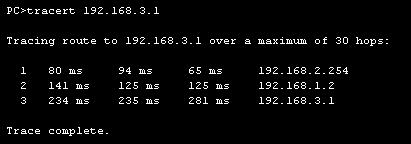
PERIFIKASI
KONFIGURASI
1. Tampilkan
konfigurasi yang sedang berjalan pada tiap router dengan printah show
running-config
2. Temukan hostname, password, ip address dan protokol routing pada router yang telah di konfigurasi
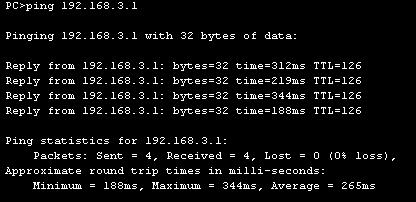
3. Ping PC2 dari Command Prompt PC1
2. Temukan hostname, password, ip address dan protokol routing pada router yang telah di konfigurasi
3. Ping PC2 dari Command Prompt PC1


Tidak ada komentar:
Posting Komentar